
Settlement Card Zip Code Issue
If a driver is experiencing issues using their settlement card online due to a ZIP code error, follow these steps to resolve the issue:
Step 1: Confirm that the driver is using the correct ZIP code associated with their card.
They should use their home address or the ZIP code entered during the card setup.
They should use their home address or the ZIP code entered during the card setup.
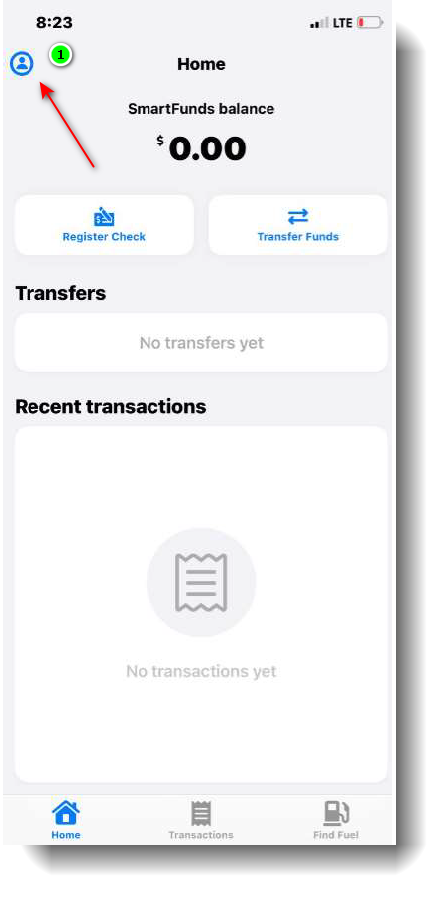
Step 2: Guide the driver to check their profile in the EFS app.
They can do this by tapping the profile icon (person figure) to access their personal information.
They can do this by tapping the profile icon (person figure) to access their personal information.
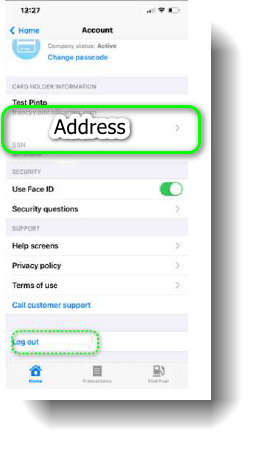
Step 3: Once in the profile section, they should verify that the ZIP code matches the registered address.
If incorrect, they can update the address within the app.
If incorrect, they can update the address within the app.
Step 4: If the issue persists, verify the driver’s bank account status.
An unverified bank account may also cause payment failures.
An unverified bank account may also cause payment failures.
If further assistance is needed, EFS support can manually update the bank account and routing number for verification.